
Blog Post
How to Recharge IGET Bar Pro
Sep
How to Recharge IGET Bar Pro: A Practical Guide for Users
How to Recharge IGET Bar Pro, is commonly described as a rechargeable vape device, which makes it different from many traditional disposable-style vapes that are discarded once their battery is depleted. If you are searching for how to recharge IGET Bar Pro, the first thing to establish is whether your exact device is designed to be rechargeable and where its charging port is located.
Because IGET products can vary by model and market, always follow the instructions supplied with your particular device. Do not attempt to modify a device that was not designed for charging.
What Is the IGET Bar Pro?
The IGET Bar Pro is part of the IGET range and is generally associated with a rechargeable battery design. Product descriptions for versions of the Bar Pro commonly mention features such as a USB charging connection and, depending on the version, adjustable airflow.
The rechargeable design means that a depleted battery may be recharged rather than immediately throwing away the entire device.
However, charging the battery does not mean that the device can necessarily be used indefinitely. Other components, including the coil and e-liquid supply, have a finite service life.
The exact specifications of an IGET Bar Pro can vary, so it is important to check the packaging or instructions for the specific model you have.
Is the IGET Bar Pro Rechargeable?
If you have an IGET Bar Pro specifically designed with a charging port, it can be recharged according to the manufacturer’s instructions.
Before connecting anything, inspect the device carefully. Look for:
- A designated charging port
- Visible damage to the casing
- Damage around the charging connection
- Signs of liquid entering the charging port
- Unusual swelling or deformation
- Previous overheating
If the device is damaged, unusually hot, swollen, leaking heavily, or behaving abnormally, do not attempt to recharge it.
Rechargeable vaping devices commonly contain lithium-ion batteries. Damaged lithium batteries can present fire and other safety hazards.
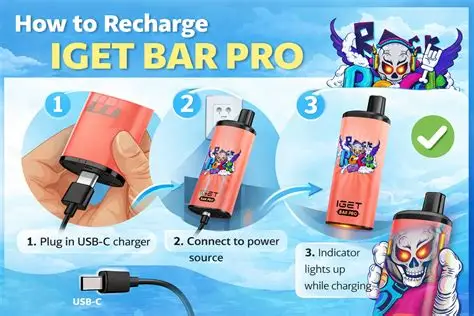
How to Recharge an IGET Bar Pro
If your specific IGET Bar Pro is a rechargeable version, the basic process is straightforward.
Step 1: Check the Device
Before charging, examine the device.
Make sure the body is intact and that the charging port is clean and undamaged. Do not charge a device with a cracked casing, damaged battery compartment, or signs of overheating.
If the device has been dropped or exposed to water, do not automatically assume that it is safe to charge.
Step 2: Locate the Charging Port
Look around the bottom or other designated area of the IGET Bar Pro for the manufacturer’s charging connection.
Some versions may use USB-C or another connection. Do not force a cable into the port.
If the connector does not fit naturally, stop and check the model’s instructions.
Step 3: Use Compatible Charging Equipment
Connect the appropriate charging cable to the device.
Use charging equipment recommended by the manufacturer or otherwise specified as compatible for that model.
Avoid experimenting with chargers or power sources simply because a connector happens to fit.
Step 4: Connect the Power Source
After connecting the cable to the device, connect it to a suitable power source according to the manufacturer’s instructions.
Place the device on a stable, non-flammable surface while it charges.
Avoid charging it underneath pillows, blankets or clothing where heat can accumulate.
Step 5: Watch the Charging Indicator
Many rechargeable vape devices use an LED or other indicator to show charging status.
The precise indicator behaviour can differ between models. For example, a light may appear while the battery is charging and change or switch off when charging is complete.
Do not rely on a generic charging time found online if your device’s instructions provide different information.
Step 6: Disconnect When Charging Is Complete
Once the device indicates that charging has finished, disconnect it according to the manufacturer’s instructions.
There is generally no reason to leave a small rechargeable vaping device connected to power indefinitely.
After charging, inspect the device again. If it is excessively hot or shows any unusual behaviour, discontinue use.
How Long Does an IGET Bar Pro Take to Charge?
There is no single charging time that can safely be applied to every IGET Bar Pro.
Charging duration can depend on:
- Battery capacity
- Battery condition
- Charging equipment
- Power source
- Device version
- Battery age
- Temperature
For that reason, it is better to follow the charging indicator and manufacturer’s instructions instead of relying on an exact number of minutes published by an unrelated website.
If the device takes substantially longer to charge than expected, becomes very hot, or repeatedly stops and starts charging, unplug it and stop using it until you can determine whether the device is safe.
Can You Use the IGET Bar Pro While Charging?
It is better not to assume that a rechargeable vape should be used while connected to power.
Even if a particular device appears capable of operating while charging, users should follow the manufacturer’s instructions rather than experimenting with pass-through use.
Using a device while it is connected to a power source can also make it more difficult to notice abnormal heating or other charging problems.
The safest approach is to allow the device to complete its charging cycle and disconnect it before normal use, unless the manufacturer specifically states otherwise.
What If the IGET Bar Pro Is Not Charging?
If your IGET Bar Pro does not appear to charge, do not immediately assume that the battery is completely dead.
Several things could be responsible.
Check the Cable
Inspect the charging cable for cuts, broken connectors or other damage.
If the cable is damaged, stop using it.
Check the Charging Port
Dust or debris can interfere with electrical contact. However, avoid inserting metal objects or sharp tools into the port.
Do not scrape aggressively inside the charging connection.
Check the Power Source
If the manufacturer’s instructions permit the particular power source you are using, check whether another compatible power source works.
Do not repeatedly switch between random high-power chargers in an attempt to force the battery to charge.
Check for Battery Damage
A battery that is swollen, leaking, unusually hot or physically damaged should not be charged.
Do not attempt to open the device to repair or replace its internal battery yourself.
Check the Device Instructions
Different IGET models can have different charging arrangements. Make sure the instructions you are following actually apply to your Bar Pro version.
Why Does My IGET Bar Pro Stop Charging?
A rechargeable device can stop charging for several reasons.
The battery could have reached its charging limit, the cable could be defective, the charging connection could be damaged, or the internal electronics could have developed a fault.
Environmental temperature can also affect lithium-ion battery charging.
If the device repeatedly starts and stops charging, becomes unusually warm, or shows other abnormal behaviour, disconnect it rather than repeatedly reconnecting it.
What Does a Flashing Light Mean?
A flashing light can mean different things depending on the device.
It may indicate:
- Low battery
- Charging
- Completed charging
- A connection issue
- A protection feature
- A device fault
There is no universal meaning for every LED pattern.
The most reliable source is the documentation supplied with the specific IGET Bar Pro. If the light pattern is accompanied by overheating, a burning smell, swelling or other physical abnormalities, stop using the device.
Can You Recharge an IGET Bar Pro Without Its Original Cable?
You should use the charging cable specified or recommended for your particular device.
A cable that physically fits is not automatically suitable.
If the original cable is missing, check the manufacturer’s instructions for the required connection and charging specifications before using another cable.
Avoid modifying connectors or using damaged cables.
Why Battery Safety Matters
Rechargeable vape devices typically use compact lithium-ion batteries. These batteries are useful because they can store a substantial amount of energy in a small package, but they need to be handled correctly.
Avoid:
- Dropping or crushing the device
- Opening the battery housing
- Puncturing the battery
- Exposing the device to extreme heat
- Charging a visibly damaged device
- Leaving damaged batteries unattended
- Using damaged cables
- Attempting DIY battery repairs
Never put a damaged lithium battery into ordinary household waste. Follow local battery and electronic-waste disposal guidance.
What If the IGET Bar Pro Gets Hot While Charging?
Some warmth during charging can occur with rechargeable electronics, but excessive or rapidly increasing heat is a warning sign.
If the IGET Bar Pro becomes unusually hot:
- Disconnect it from power if it is safe to do so.
- Move away from the device if there is smoke, fire or severe overheating.
- Do not continue charging it.
- Do not attempt to dismantle the battery.
- Follow local guidance for damaged lithium batteries.
If a battery is smoking or burning, do not handle it directly.
Can You Recharge a Completely Dead IGET Bar Pro?
A battery that appears completely depleted may sometimes recover when connected to the correct charging equipment.
However, if the device has been stored for a long period, has suffered physical damage, or refuses to charge normally, do not try to force the battery back into operation.
Repeatedly connecting and disconnecting a failed device is not a substitute for proper troubleshooting.
If the manufacturer identifies the device as non-serviceable, replacement rather than repair may be necessary.
Recharging vs Replacing the Device
One advantage of a rechargeable design is that the battery can be replenished during the device’s intended service life.
However, charging the battery does not replenish e-liquid.
Once the vaping material has been consumed, the device may no longer produce vapour even though the battery still has power.
This is one reason a device that will not produce vapour should not automatically be assumed to have a battery problem.
Other possible causes include a depleted liquid supply, coil deterioration, airflow obstruction or an electronic fault.
Signs That the Device May Be at the End of Its Life
Consider discontinuing use if the device develops:
- Persistent burning or unusual taste
- Significant leakage
- Repeated charging failures
- Physical damage
- Unusual battery heating
- Swelling or deformation
- Persistent activation problems
- A damaged charging port
Do not attempt to extend the life of a sealed device by opening it, replacing internal components or modifying the battery.
IGET Bar Pro Charging in Australia
Australian readers should also understand that charging instructions and legal availability are separate issues.
The Australian Therapeutic Goods Administration states that vaping goods are regulated nationally and that vapes are only lawfully available for therapeutic purposes through pharmacy settings under the applicable framework. Non-pharmacy retailers such as tobacconists, vape shops and convenience stores cannot supply vapes.
The TGA also maintains a notified-vape list for therapeutic vaping goods that may legally be supplied under the relevant pathways.
Therefore, an online listing for an IGET Bar Pro does not by itself establish that the specific product is lawfully available for supply in Australia.
Australian consumers should check the current TGA information and relevant state or territory requirements.
Can You Import an IGET Bar Pro Into Australia?
This is another important consideration for people searching for the product online.
The TGA says that vapes cannot be purchased from overseas retailers or websites for personal use, and personal importation is prohibited subject to the rules and limited circumstances specified by Australian authorities.
Consequently, consumers should not assume that an overseas website offering an IGET Bar Pro means the device can legally be ordered and shipped into Australia.
The regulatory position can also distinguish between personal possession, personal importation, commercial supply and advertising.
Is Recharging Safer Than Using a Disposable?
Rechargeability is primarily a device feature, not a guarantee of safety.
A rechargeable vape still involves a battery, vaping aerosol and, where applicable, nicotine.
A rechargeable device should therefore not be considered harmless simply because it can be charged repeatedly.
The TGA notes that therapeutic vapes are not first-line treatment for smoking cessation or management of nicotine dependence.
People who do not use nicotine should not start vaping because a device is rechargeable, compact or advertised as convenient.
Frequently Asked Questions
How do I recharge an IGET Bar Pro?
If your particular Bar Pro is a rechargeable version, connect the appropriate charging cable to its designated charging port and a compatible power source, following the manufacturer’s instructions. Do not charge a damaged or unusually hot device.
Does the IGET Bar Pro use USB-C?
Some product descriptions identify rechargeable IGET Bar Pro versions with USB-C-style charging, but users should verify the exact connector on their individual model rather than assuming every Bar Pro version is identical.
Why won’t my IGET Bar Pro charge?
Possible causes include a damaged cable, charging-port problem, depleted or damaged battery, incompatible power source or an internal fault. If the device becomes hot or shows physical damage, stop charging it.
Can I leave my IGET Bar Pro charging overnight?
It is preferable to follow the manufacturer’s charging instructions and disconnect the device when charging is complete rather than leaving it connected indefinitely.
Can I use my IGET Bar Pro while charging?
Do not assume that this is safe or supported. Follow the instructions for the specific device, and avoid using a vape while it is connected to a charger unless the manufacturer explicitly permits it.
How do I know when charging is complete?
The device’s indicator system may show charging status, but the exact light or display behaviour depends on the model. Consult the instructions supplied with your device.
What should I do if my IGET Bar Pro gets very hot?
Disconnect it from power if safe to do so and stop using it. Do not open or attempt to repair the battery.
Can I replace the battery myself?
Do not attempt to replace an internal battery unless the manufacturer specifically provides a safe, approved replacement procedure. Opening a sealed lithium-battery device can create serious safety risks.
Final Thoughts
Learning how to recharge IGET Bar Pro is relatively straightforward when you have a rechargeable model and follow the manufacturer’s instructions. The essential principles are to inspect the device first, use the correct charging equipment, charge it on a suitable surface, monitor it during charging and stop immediately if the device becomes unusually hot or damaged.
Most importantly, do not attempt to modify or repair the internal battery simply to make an old device rechargeable again.
For readers in Australia, there is an additional consideration: the legality of the particular vape product is separate from its charging capability. Australia’s current framework restricts the lawful supply of vaping goods to pharmacy settings for therapeutic purposes, subject to the applicable requirements.
Before purchasing, importing, supplying or using an IGET Bar Pro in Australia, check the latest TGA guidance and applicable state or territory requirements rather than relying solely on an overseas product listing.

Hi, this is a comment.
To get started with moderating, editing, and deleting comments, please visit the Comments screen in the dashboard.
Commenter avatars come from Gravatar.