
Blog Post
how to recharge iget one
Nov
How to Recharge IGET One: A Practical Guide for Users in Australia
how to recharge IGET One, the first thing to establish is whether your particular IGET One model is actually designed to be rechargeable. This matters because different IGET products can have different battery designs, and attempting to charge a disposable device that was not designed for recharging can create a battery or electrical safety risk.
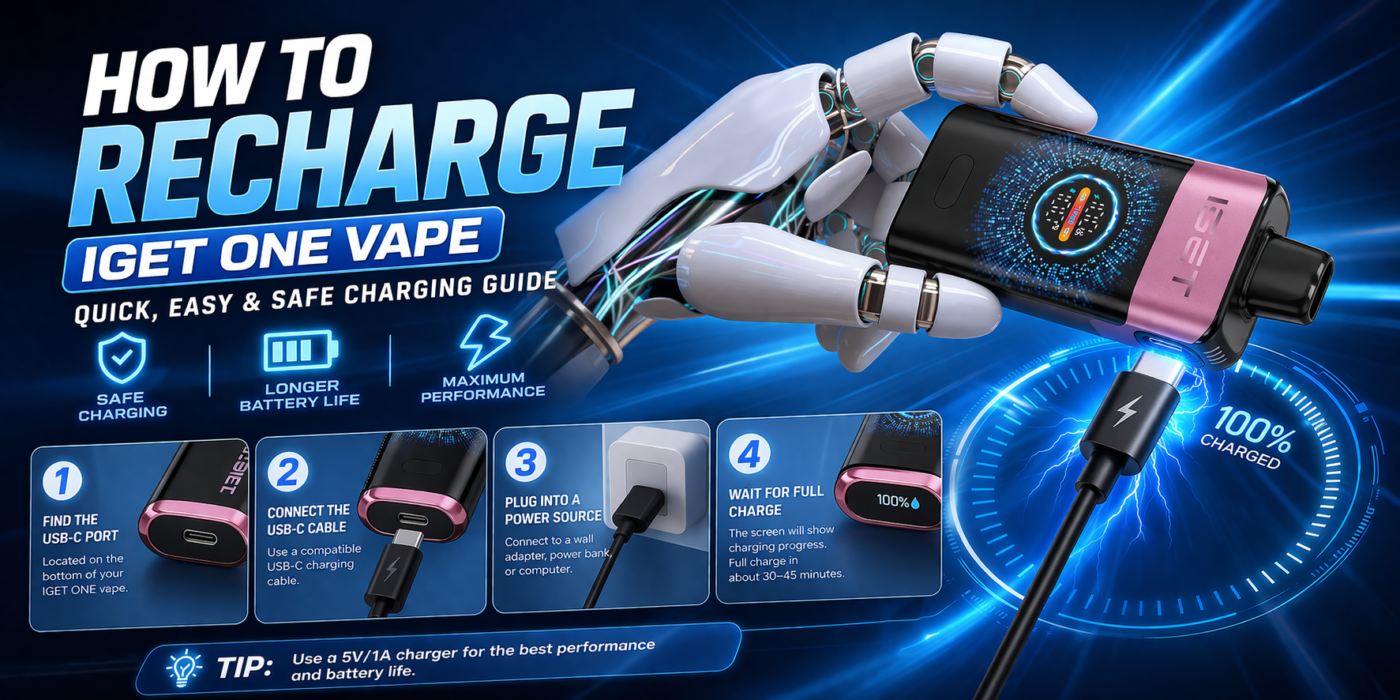
For rechargeable versions, the process is generally straightforward: identify the charging port, use a compatible cable, connect it to a suitable low-power USB power source, monitor the device while charging, and disconnect it once charging is complete. However, you should always follow the instructions supplied with your specific device rather than relying solely on a generic charging procedure.
For Australian users, there is another important consideration. Australia’s vaping regulations have changed substantially, and the lawful supply of vaping products is restricted to therapeutic purposes through pharmacy pathways.
Is IGET One Rechargeable?
Whether an IGET One can be recharged depends on the exact version you have.
Some disposable-style vaping products are manufactured with an internal battery intended to last for the usable life of the device. Others have rechargeable batteries and therefore include a charging connection. A charging port is usually the easiest physical indication that a device has been designed for charging, but its presence alone should not be treated as permission to improvise with charging equipment.
Before searching for a charging cable or plugging anything into the device, check:
- The product packaging
- The manufacturer’s instructions
- The markings around the device
- Whether a charging port is specifically identified
- Whether the model is described as rechargeable
If your IGET One has no charging port and no instructions indicating that it is rechargeable, do not attempt to modify it or attach wires to the battery.
A disposable device that has reached the end of its intended battery life should not be opened simply to access the internal battery.
What You Need to Recharge a Rechargeable IGET One
If your specific IGET One model is designed to be rechargeable, you generally need only the appropriate charging cable and a suitable USB power source.
The most important point is compatibility.
Do not assume that every USB cable, charger or power adapter is appropriate merely because the connector fits. The charging specifications supplied with your particular device should take priority.
A basic charging setup may include:
- Your rechargeable IGET One.
- The compatible charging cable.
- A suitable USB power source.
- A clean, dry and stable surface where the device can remain visible while charging.
Avoid using damaged cables, loose connectors or visibly damaged devices.
How to Recharge IGET One Step by Step
1. Check the Device
Before connecting anything, inspect your IGET One.
Look for obvious damage such as:
- Cracks
- Severe dents
- A swollen body
- Liquid leakage
- Burn marks
- A damaged charging port
- Exposed wires
- Unusual heat
If the device appears damaged, do not connect it to power.
Lithium-ion batteries require appropriate handling, and physical damage can increase the risk of overheating or failure.
2. Locate the Charging Port
If your IGET One is a rechargeable model, locate its designated charging port.
Depending on the version, the connector may be positioned on the bottom or another part of the device. Keep the port free from dust, liquid and debris.
Do not force the cable into the port.
If the connector does not fit naturally, stop and check whether you have the correct cable.
3. Connect the Correct Cable
Connect the cable to the device carefully.
The connection should be secure without requiring excessive pressure.
Avoid repeatedly inserting and removing a connector unnecessarily because physical wear can eventually damage the charging port.
4. Connect to an Appropriate Power Source
Once the cable is connected correctly, connect it to the appropriate USB power source recommended by the product instructions.
Avoid improvised charging arrangements.
In particular, do not:
- Connect loose wires directly to the battery
- Attempt to charge the device through a modified connection
- Use visibly damaged charging equipment
- Leave a homemade charging setup unattended
- Open the device to access its battery
The goal is to use the charging system the manufacturer intended for the product.
5. Monitor the Device While Charging
Do not leave a rechargeable vaping device charging unattended for extended periods.
Place it on a stable, non-flammable surface away from bedding, clothing, paper and other materials that could obstruct heat dissipation or contribute to a fire.
If the device becomes unusually hot, starts producing an unusual smell, makes unexpected noises, swells, leaks or behaves abnormally, disconnect it from power if it is safe to do so and stop using it.
6. Disconnect When Charging Is Complete
Once the device indicates that charging has finished, disconnect it according to the manufacturer’s instructions.
There is generally no benefit in leaving an electronic device connected to power unnecessarily.
After disconnecting it, inspect the device again before use.
How Long Does IGET One Take to Charge?
There is no single charging time that can safely be applied to every product carrying the IGET One name.
Charging time can depend on:
- Battery capacity
- Battery condition
- Charging current
- Cable condition
- Power-source specifications
- Temperature
- The particular IGET One version
For that reason, avoid relying on a generic claim such as “it always takes one hour” or “it always takes two hours.”
Instead, use the charging indicator and instructions supplied with your particular model.
If the device does not appear to charge after being connected correctly, disconnect it and troubleshoot the problem rather than leaving it connected indefinitely.
What Does the Charging Indicator Mean?
Rechargeable vaping devices may use an LED or another indicator to communicate charging status.
The exact behaviour varies between models.
An indicator might show that:
- Charging has started
- The battery is still charging
- Charging is complete
- The device has detected a fault
However, the meaning of a particular colour or flashing pattern should be confirmed against the instructions for your exact IGET One.
Do not assume that a flashing light always means the same thing across different IGET products.
What If IGET One Is Not Charging?
If your rechargeable device is not charging, start with the simplest possibilities.
Check the Cable
Inspect the charging cable for visible damage.
A broken, frayed or loose cable should not be used.
If your product documentation identifies a specific compatible cable, use that rather than experimenting with alternative wiring.
Check the Charging Port
Look carefully at the charging port.
Dust or debris can interfere with a connection, but avoid inserting sharp objects into the port.
Never attempt to scrape or manipulate internal electrical contacts.
Check the Power Source
The problem may be with the USB power source rather than the device.
If the manufacturer’s instructions specify an appropriate power source, follow those specifications.
Allow the Device to Cool
If the device has become unusually warm, disconnect it and allow it to return to normal temperature.
Do not attempt to accelerate cooling with a refrigerator, freezer or water.
Look for Physical Damage
If the device is swollen, cracked, leaking or otherwise damaged, stop using it.
A damaged lithium-ion battery should not be treated as an ordinary charging problem.
Can You Recharge an IGET One Without a Charging Port?
No improvised method should be used.
If a particular IGET One does not have a manufacturer-provided charging connection, do not try to recharge it by cutting open the casing, attaching wires to the battery or connecting it directly to a USB source.
Such modifications can bypass the device’s intended electrical protection and potentially cause overheating, fire or battery failure.
A missing charging port is therefore not a problem that should be solved through DIY modification.
Can You Use a Phone Charger?
The answer depends on the charging specifications of your particular rechargeable model.
The fact that a phone charger has a compatible-looking USB connector does not automatically mean that it is suitable for every vaping device.
Check the product’s instructions for its charging requirements before connecting it to a power adapter.
If you cannot verify compatibility, do not experiment with chargers.
Can You Use a Power Bank?
Again, compatibility depends on the device and its manufacturer’s instructions.
A power bank may provide USB power, but that does not automatically establish that it is an appropriate charging source for a particular vape.
If the manufacturer does not specify power-bank charging, using one should not be treated as automatically safe.
What Should You Do If the Battery Gets Hot?
Some warmth during electronic charging can occur, but unusual or rapidly increasing heat is a warning sign.
If your IGET One becomes excessively hot:
- Stop charging.
- Disconnect the cable if it is safe to do so.
- Move away from the device if it appears damaged or is producing smoke.
- Do not continue using it.
- Seek appropriate advice about safe battery disposal.
Never puncture, crush or deliberately damage a lithium-ion battery.
Can You Vape While IGET One Is Charging?
Do not assume that a device supports pass-through vaping.
Some rechargeable electronics are designed to operate while connected to power, while others are not.
Unless the manufacturer specifically states that your particular IGET One supports use while charging, the safer approach is to disconnect it before using it.
Using a device while charging can also make it more difficult to notice abnormal heating or other problems.
Why Proper Charging Matters
Rechargeable vape devices contain lithium-ion batteries, which store significant amounts of energy in a compact space.
Safe charging depends on several factors, including:
- Battery quality
- Charging circuitry
- Correct voltage and current
- Temperature
- Physical condition
- Proper electrical connections
This is why modifying a device or using an unknown charging setup is not recommended.
The charging procedure should always be based on the manufacturer’s specifications rather than generic instructions copied from another device how to recharge iget one.
What If the IGET One Battery Dies Completely?
If your rechargeable IGET One has stopped working because its battery is depleted, connect it to its intended charging system and check whether the charging indicator responds.
If nothing happens, investigate the cable, power source and charging port.
However, if the device has reached the end of its service life, charging may no longer restore normal operation.
A battery that repeatedly fails to hold a charge may be worn out rather than simply empty.
Do not open the device to replace the battery unless the manufacturer has specifically designed the product for user-replaceable batteries and provides instructions for doing so.
Charging Safety Tips
A few simple habits can reduce unnecessary battery risks.
Keep the Device Dry
Never charge a wet device.
Moisture around electrical connections can cause malfunction or short circuits.
Avoid Extreme Temperatures
Do not charge the device in extremely hot or cold environments.
A normal indoor environment away from direct sunlight is generally preferable.
Don’t Charge on Soft Materials
Avoid charging on beds, sofas, pillows or piles of clothing.
Use a stable, hard surface where you can easily observe the device.
Don’t Cover the Device
Do not place clothing or other objects over a charging device.
Don’t Use Damaged Equipment
Replace damaged cables and stop using visibly damaged vape batteries.
Don’t Leave Charging Unattended
Keeping the device within view allows you to respond quickly if something unusual occurs.
What If Your IGET One Is Empty but Still Charges?
Battery charge and e-liquid availability are two separate things.
A rechargeable battery may still accept a charge even when the consumable portion of the device has reached the end of its usable life.
Similarly, a device can contain e-liquid but have a depleted or failed battery.
Charging the battery does not necessarily mean that the device can continue producing vapour indefinitely.
Do not attempt to refill a sealed disposable-style device unless it was specifically designed as a refillable product.
How to Tell Whether the Problem Is the Battery or the Device
A simple distinction can help.
If the device shows a normal charging indication but does not operate after charging, the problem may involve the battery, electronics, coil or another component how to recharge iget one.
If there is no charging indication at all, possible causes include the cable, power source, charging port or internal battery.
If the device is damaged, leaking or unusually hot, stop troubleshooting and discontinue use.
Repeatedly connecting and disconnecting a faulty battery will not necessarily fix the underlying problem.
IGET One and Australian Vape Regulations
For readers in Australia, charging guidance should be considered separately from the legal status of the product.
Australia’s vaping framework is highly regulated. The Therapeutic Goods Administration states that vaping goods are subject to national regulation, and therapeutic vapes can only lawfully be supplied through pharmacy pathways for therapeutic purposes, subject to applicable requirements.
The Australian Government also states that tobacconists, vape shops and convenience stores cannot legally sell vaping products. (Health.gov.au)
Personal importation of vapes from overseas retailers or websites is also prohibited under the current framework.
This means Australians should not assume that an IGET One advertised online or through an overseas retailer is automatically a legally supplied product.
The TGA maintains a notified list of therapeutic vaping goods that can legally be supplied through the relevant pathways.
Rules can also differ between Australian states and territories, so consumers should check current requirements applicable where they live.
Responsible Use and Nicotine
If an IGET One contains nicotine, it should be treated as a nicotine-containing product.
Nicotine can cause dependence, and vaping is not risk-free. how to recharge iget one The TGA advises consumers about the health risks associated with vaping and states that therapeutic vapes are not first-line treatments for smoking cessation or management of nicotine dependence.
People considering vaping for smoking cessation should discuss appropriate options with a healthcare professional or pharmacist.
Keep nicotine-containing products away from children and pets. Nicotine exposure can be dangerous, particularly if liquid is swallowed or comes into contact with the body inappropriately.
When You Should Stop Using the Device
Charging should stop immediately if you notice:
- Significant overheating
- Swelling
- Leakage
- Smoke
- Burning smells
- Cracks around the battery
- A damaged charging connector
- Repeated electrical faults
Do not attempt to repair a damaged lithium-ion battery yourself.
The safest response to a seriously damaged device is to stop using it and obtain advice about appropriate disposal.
Frequently Asked Questions
How do I recharge IGET One?
First confirm that your particular IGET One is a rechargeable model. If it is, use the manufacturer’s specified charging cable and power source, connect the cable carefully, monitor the device during charging and disconnect it once charging is complete.
Can I recharge a disposable IGET One?
Only if that particular model was designed by the manufacturer to be rechargeable. Do not modify a disposable device to add charging capability.
Why is my IGET One not charging?
Possible causes include a damaged cable, unsuitable power source, dirty or damaged charging port, depleted battery or an internal fault. If the device is damaged or becomes unusually hot, stop using it.
Can I leave IGET One charging overnight?
It is better not to leave a lithium-ion vaping device charging unattended or overnight. Follow the manufacturer’s charging instructions and disconnect the device when charging is complete.
Can I use any USB charger?
No. Connector compatibility does not necessarily mean electrical compatibility. Use the charging equipment specified for your particular model.
What if my IGET One gets hot while charging?
Disconnect it if safe to do so and stop using it if the heat is unusual or excessive. Do not continue charging a device that is overheating, swelling, leaking or otherwise malfunctioning.
Can I open IGET One to replace the battery?
A sealed device should not be opened for DIY battery replacement. Doing so can damage the battery and remove safety protections.
Final Thoughts
Learning how to recharge IGET One is mainly about identifying the exact model and following its intended charging procedure. If your device is specifically designed to be rechargeable, use the correct cable and compatible power source, charge it on a stable surface, monitor it during charging and disconnect it when charging is complete.
Most importantly, never try to convert a non-rechargeable disposable device into a rechargeable one. Do not puncture, open, wire or otherwise modify the battery.
For Australian users, charging is only one part of the issue. Current Australian regulations place significant restrictions on the supply, importation and sale of vaping products, with lawful therapeutic supply operating through regulated pharmacy pathways.
