
Blog Post
how to recharge iget bar with iphone charger
Dec
How to Recharge IGET Bar With iPhone Charger: A Complete Guide
If you are searching for how to recharge IGET Bar with an iPhone charger, the first thing to understand is that not every IGET Bar is rechargeable. The standard IGET Bar is generally designed as a sealed, single-use device without a charging port, while some newer IGET models are rechargeable and use USB-C.
This distinction is important because trying to open a sealed disposable vape and connect an iPhone cable directly to its internal battery can create serious battery and fire risks. For that reason, this guide focuses on identifying your device, understanding iPhone charging connections, and using the manufacturer’s intended charging method rather than modifying a sealed battery.
Can You Recharge an IGET Bar With an iPhone Charger?
The answer depends on which IGET model you have.
A conventional IGET Bar without a charging port is not designed to be recharged. Some product information describes the regular IGET Bar as having no charging port and being intended for use until its battery or e-liquid is depleted.
Other IGET products, including certain rechargeable models, have a USB-C charging port. These devices can be charged with an appropriate USB-C cable and compatible power source. (IGET Bar Australia)
Therefore, before searching for an iPhone charger or cable, look at the bottom of your device.
Check for a charging port
If your IGET has a clearly marked USB-C port, it may be rechargeable.
If there is no charging port, do not try to create one by cutting the device open.
This is particularly important with lithium-ion batteries. A sealed vape contains a battery, heating element, wiring and e-liquid inside a small enclosure. Opening the enclosure can damage insulation or create an accidental short circuit.
What Does “iPhone Charger” Mean?
The phrase iPhone charger can refer to several different things.
Older iPhones commonly used Apple’s Lightning connector. Newer iPhones use USB-C. The wall adapter is another separate component.
For example, you might have:
- A USB-C wall adapter
- A USB-C-to-USB-C cable
- A USB-C-to-Lightning cable
- An older USB-A wall adapter
- A Lightning cable
- A USB-C iPhone charging cable
These combinations are not automatically interchangeable with every vape.
If your rechargeable IGET device has a USB-C charging port, you need a suitable USB-C cable. A Lightning connector cannot simply be inserted into a USB-C vape port.
Why You Should Not Modify a Standard IGET Bar
Some online guides describe cutting a charging cable, opening an IGET Bar and connecting exposed wires to the battery terminals. Although such instructions can be found online, this is not a charging method I recommend.
One online IGET guide itself acknowledges that most standard IGET Bars are disposable and describes DIY charging as something users should undertake at their own risk.
Another guide describes opening the device and exposing internal wiring. (I Get Bar Australia)
The problem is that this approach bypasses the device’s intended charging and battery-protection system. Incorrect polarity, a short circuit, damaged battery insulation, excessive current or physical battery damage can cause overheating or failure.
A phone charger being available does not make a sealed vape battery safe to charge.
How to Tell Whether Your IGET Is Rechargeable
Before connecting anything, inspect the device carefully.
1. Look at the bottom
Check the bottom edge or base of your IGET.
A rechargeable device should have a proper charging port. Depending on the model, that may be USB-C.
A conventional disposable model may have no port at all.
2. Check the packaging
Look for terms such as:
- Rechargeable
- USB-C
- Type-C
- Charging port
- Rechargeable battery
Also check the exact model name rather than assuming every product carrying the IGET name has the same battery design.
3. Identify the model
IGET products vary considerably. Current online product information identifies rechargeable models such as certain Bar Pro, One and Bar Plus products, while other models are described as sealed devices without charging ports. (IGET Bar Australia)
Because product specifications can vary by model and market, the exact model printed on your packaging is more useful than the general term “IGET Bar.”
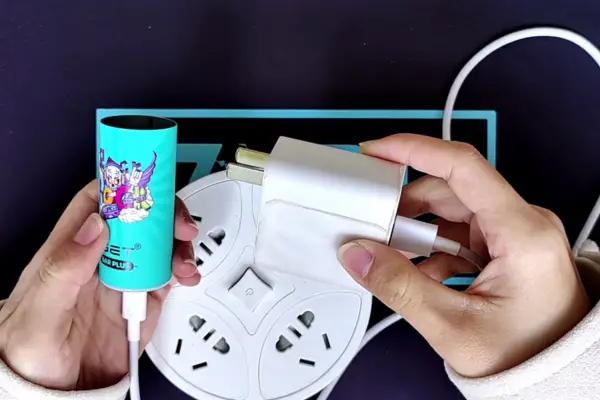
If Your IGET Has USB-C
If you have a model specifically designed for USB-C charging, the process is much simpler.
Use the charging cable specified for the device and connect it to a suitable power adapter.
A general charging sequence is:
- Inspect the device for damage.
- Make sure the charging port is clean and dry.
- Insert the correct cable gently.
- Connect the cable to a suitable power source.
- Check whether the device’s charging indicator responds.
- Place the device on a stable, non-flammable surface while charging.
- Disconnect it when charging is complete or according to the manufacturer’s instructions.
Some IGET charging information describes USB-C rechargeable models as taking approximately 30–60 minutes, although charging time varies by model, battery condition and charger. (IGET Vapes Australia Store)
Do not treat 30 or 60 minutes as a universal charging time for every IGET product.
Can You Use an Apple Wall Adapter?
If your IGET model is designed for USB charging, the important consideration is the device’s charging specification and cable, rather than simply whether the adapter carries an Apple logo.
However, avoid assuming that every Apple fast-charging setup is appropriate for every vape.
The safest approach is to follow the charging specifications supplied with the particular IGET model. If the manufacturer does not identify the device as rechargeable, do not attempt to charge it.
The Australian Government also emphasizes that vaping products are not safe and that vaping products in Australia are subject to specific regulations.
What About an iPhone Lightning Cable?
This is one of the most common points of confusion.
A Lightning cable is designed around Apple’s Lightning connector. If your IGET has a USB-C charging port, a Lightning connector does not match the port.
You should not:
- Cut the Lightning cable
- Strip its wires
- Connect exposed wires to a vape battery
- Attach the wires directly to the battery terminals
- Insert modified cables into the device
A cable is not simply a collection of positive and negative wires that can safely be connected to any lithium battery.
Modern charging cables and devices can contain identification, communication and protection components. Modifying them removes the controlled connection that the original equipment was designed to provide.
What If the IGET Bar Has No Charging Port?
If your standard IGET Bar has no charging port, the appropriate response is not to recharge it with an iPhone charger.
Once the battery is depleted, the device has reached the end of its intended battery life.
Trying to recharge a sealed disposable can involve opening the enclosure and exposing the battery. That creates unnecessary risks and can also cause e-liquid leakage or physical damage to the device.
Instead, dispose of the depleted device through an appropriate e-waste or battery-disposal pathway where available.
The Australian Government notes that vapes contain lithium-ion batteries and electronic components and should not be placed in ordinary kerbside rubbish because they can create a fire risk.
Why Cutting a Charger Is Dangerous
You may encounter articles claiming that you can recharge an IGET Bar by cutting an old iPhone or USB cable.
This method should not be treated as a normal charging technique.
A lithium-ion battery requires controlled charging. The charging system needs to manage voltage and current and provide appropriate protection.
When someone opens a disposable vape and manually connects wires, several things can go wrong.
Incorrect polarity
Connecting positive and negative incorrectly can damage the battery or electronics.
Short circuits
If exposed conductors touch each other or another conductive component, a short circuit can occur.
Excessive heat
A damaged lithium battery can become dangerously hot.
Battery damage
Puncturing, bending, crushing or otherwise damaging a lithium battery can cause a serious failure.
E-liquid leakage
Opening a disposable vape can damage seals around the reservoir and cause e-liquid to leak into the electronics.
For these reasons, a phone charger should never be treated as a DIY battery charger for a sealed disposable vape.
How to Charge a Rechargeable IGET Safely
If you have confirmed that your specific IGET model is rechargeable, follow a straightforward routine.
Use the intended charging port
Never drill, cut or modify the device to create a charging connection.
The charging port should already be built into the device.
Use an undamaged cable
Inspect the cable before use.
Avoid cables with:
- Exposed wires
- Crushed connectors
- Melted insulation
- Bent plugs
- Damaged USB ends
Check the vape before charging
Do not charge a device that is visibly damaged.
Look for:
- Cracks
- Swelling
- Severe dents
- Burn marks
- Liquid around the charging port
- Unusual heat
- A damaged connector
If you notice any of these problems, stop using the device.
Charge on a suitable surface
Keep the device away from bedding, clothing, paper and other combustible materials while charging.
Do not cover it with clothing or a pillow.
Avoid unattended charging
Don’t leave a vape charging overnight or for extended periods when nobody is around.
Disconnect when finished
Once the charging cycle is complete according to the manufacturer’s instructions, disconnect the device.
How Long Does an IGET Take to Recharge?
There isn’t one charging time that applies to every IGET.
Some rechargeable IGET information gives an approximate range of 30–60 minutes, but the actual duration depends on the model and battery state. (IGET Vapes Australia Store)
A nearly empty battery may take longer than a partially charged battery.
The best reference is the manufacturer’s information for your exact model.
Avoid repeatedly reconnecting and disconnecting the device simply because you expect a specific charging time.
Why Your IGET May Not Charge
If your rechargeable IGET does not appear to charge, don’t immediately assume the battery needs to be opened.
There are several possible explanations.
The cable may be damaged
Try a known-good compatible cable.
The power source may not be working
Test the power adapter with another appropriate device.
The charging port may be dirty
Dust or debris can interfere with the connection. Do not insert sharp metal objects into the port.
The battery may be depleted or damaged
A battery that has reached the end of its useful life may no longer accept a charge normally.
The device may not actually be rechargeable
This is particularly important with the standard IGET Bar.
If there is no charging port, don’t attempt a DIY conversion.
What If the IGET Gets Hot While Charging?
Stop charging if the device becomes unusually hot.
A small amount of warmth can occur during normal battery operation, but significant or rapidly increasing heat should not be ignored.
Disconnect the device if it is safe to do so and move away from it.
Do not continue using a device that becomes excessively hot, swells, emits an unusual smell, leaks liquid or shows other signs of battery failure.
Never puncture or crush a swollen battery.
IGET Bar vs Rechargeable IGET Models
One reason people search for how to recharge IGET Bar with iPhone charger is that the IGET product family contains different device designs.
A simple comparison is useful:
| Feature | Standard sealed IGET Bar | Rechargeable IGET model |
|---|---|---|
| Charging port | Usually absent | Present on applicable models |
| Intended charging | No | Yes |
| USB-C | Depends on model; standard sealed Bar generally has none | Common on rechargeable models |
| DIY battery modification | Not recommended | Unnecessary |
| Phone charger | Not applicable | Use only as compatible with the model |
| Battery replacement | Not intended | Usually not user-replaceable |
| End of life | Dispose responsibly | Recharge until device reaches end of life |
Always verify the exact model before relying on this table.
Is Charging With an iPhone Charger Faster?
Not necessarily.
The charger does not automatically make a vape recharge faster simply because it is an Apple charger.
Charging speed depends on the charging circuitry inside the IGET, the cable, the power source and the battery.
A higher-power adapter does not mean the vape will safely accept that higher power.
For this reason, there is little benefit in experimenting with different high-powered adapters. Use the charging setup recommended for your particular device.
What About an iPhone Power Bank?
The same basic rule applies.
If you have a rechargeable IGET with a compatible USB charging connection, a suitable power bank may provide power.
However, you should check the manufacturer’s instructions for the exact model and use compatible cables and outputs.
If the IGET has no charging port, a power bank does not change that. There is no safe reason to open the device simply because a USB power source is available.
Common Mistakes to Avoid
When researching how to recharge IGET Bar with iPhone charger, it is easy to encounter unsafe DIY instructions.
Here are some mistakes worth avoiding.
Mistake 1: Assuming every IGET is rechargeable
The IGET name covers multiple models.
Mistake 2: Cutting an iPhone cable
Never strip a Lightning or USB cable to manually charge a sealed vape battery.
Mistake 3: Opening the vape
The internal battery is not designed for casual user access.
Mistake 4: Charging overnight
Avoid leaving rechargeable vape batteries charging unattended.
Mistake 5: Charging a damaged device
Damage, swelling or excessive heat can indicate a battery problem.
Mistake 6: Ignoring Australian regulations
Vaping products are regulated in Australia. The Australian Government states that since July 2024, vaping products can only be sold through pharmacies for specified therapeutic purposes, subject to applicable requirements.
Responsible Use and Australian Considerations
The charging question is only one part of using an IGET device responsibly.
Australian health authorities state that vaping is not considered safe and that many vapes contain nicotine, which is highly addictive.
If you are using a nicotine-containing vape, keep it away from children and pets and follow the applicable product and disposal requirements.
People who do not vape should not start using nicotine products simply because a rechargeable device appears convenient.
For adults who are already dependent on nicotine and want to stop, Australian health services provide quitting information and support. (Health, Disability and Ageing Oz)
Frequently Asked Questions
Can I recharge a normal IGET Bar with an iPhone charger?
If the normal IGET Bar has no charging port, it is not intended to be recharged. Do not open it or connect an iPhone cable directly to its internal battery.
Can I use USB-C with an IGET Bar?
Only if your specific IGET model has a USB-C charging port and is designed to be rechargeable.
Can I use a Lightning cable?
A Lightning cable is not a universal vape charger. If your device requires USB-C, use a compatible USB-C cable instead.
Can I cut an iPhone cable to charge an IGET?
No. Cutting the cable and attaching exposed wires to a lithium battery is an unsafe DIY modification.
How long does a rechargeable IGET take?
Some rechargeable IGET models are reported to take roughly 30–60 minutes, but charging time varies by model and conditions. (IGET Vapes Australia Store)
Why does my IGET stop working even though there is e-liquid left?
A depleted battery can prevent a rechargeable device from firing. However, if the device is a sealed disposable with no charging port, remaining e-liquid does not mean the battery can safely be recharged.
What should I do with a dead IGET?
Don’t put a vape containing a lithium battery into ordinary household rubbish. Follow local battery or e-waste disposal guidance. The Australian Government specifically warns against putting vapes in kerbside bins because of their battery-related fire risk.
Final Thoughts
The safest answer to how to recharge IGET Bar with iPhone charger begins with identifying the exact IGET model.
If your device has no charging port, don’t try to turn an iPhone cable into a DIY charger or open the vape to reach its battery. The standard sealed IGET Bar is not designed for this type of charging.
If you have a rechargeable IGET model with a built-in USB-C port, use the correct cable and follow the charging instructions for that model. An iPhone-style power adapter may be useful as a power source when it is compatible with the device’s charging requirements, but the cable and charging specifications still matter.
Most importantly, don’t bypass the device’s battery-protection system. A few extra minutes of use are not worth exposing yourself to the risks associated with modifying a lithium-ion battery. For a rechargeable device, use its built-in charging port; for a sealed disposable, dispose of it appropriately when it reaches the end of its intended life.
